
How to Make a Closing Door Prank AI Video on Genjutsu AI (Template + Photos)
Make the Closing Door Prank AI hallway clip on Genjutsu AI: upload the door-shut template, add two authorized adult photos for the closer and the runner, run Objects Swap, and download a TikTok-ready MP4.
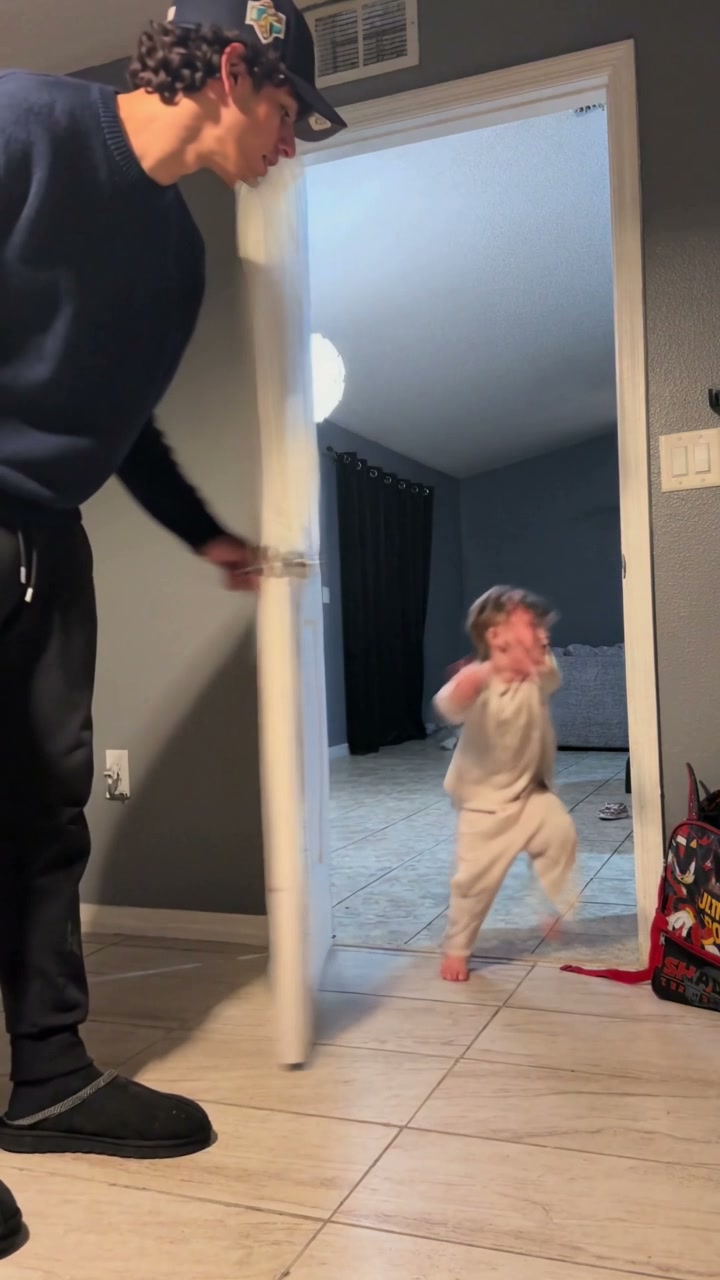
The Closing Door Prank (also called the hallway door-shut prank, close-the-door prank, or fake closing door prank) is the short family gag that blew up on TikTok in late October 2026: one person holds a door, someone else sprints down the hall, the door swings shut right as they arrive, then everyone cracks up. The joke is the timing and the face — not a real slam into wood.
You do not need CapCut, a hallway rehearsal, or anyone actually running into a door. On Genjutsu AI, the path is: pick the Closing Door Prank template on the homepage, add two authorized adult photos (door closer + runner), and run Objects Swap.
Genjutsu AI is an independent tool and is not affiliated with, endorsed by, or sponsored by the original TikTok posters of this prank (including family accounts that helped the trend take off).
Template motion reference (~8s, 9:16): keep the fixed hallway camera, white door swing, and run-to-doorway beat while you swap the two people.
What the Closing Door Prank trend is
In the real phone videos, a fixed camera looks through a doorway into a bright hallway. One person stands by a half-open door with a hand on the handle. The other waits at the far end, then runs. Just before they reach the frame, the door swings shut. A beat later the runner is on the camera side laughing — or the door opens and both of them react. Some posts swap roles and do a second run in the same clip.
By the end of October 2026, family hallway remakes were stacking millions of views. There is no single “official” song; people reuse whatever sound was under the post they copied. The AI wave that followed is simple: keep that door timing from a template, put your faces on the two roles, skip the physical stunt.
Typical output format for social (this template):
- About 8 seconds
- 9:16 vertical
- MP4, ready for TikTok / Reels / Shorts (mute the file and attach a trending sound in-app when you want the audio to match what people are scrolling)
Before you upload: authorization and safety
Only use a real-person photo when that person has authorized this use.
- Prefer photos of yourself and adults who explicitly allowed you to generate and publish the video.
- Everyone in every photo must be 18+.
- Do not upload celebrities, public figures, or anyone who did not consent.
- Do not use the result to impersonate someone or spread misleading content.
- The door gag is an optical / timing trick. Do not stage a real collision or slam a door on anyone while “researching” the trend.
Genjutsu AI expects you to confirm rights over every likeness you upload. If you cannot show permission, pick another reference — pets and illustrated characters show up a lot in adjacent prank remakes when a person photo is not appropriate.
What you need
- Closing Door Prank template video — the hallway door-shut clip already on the homepage gallery (or another short interior door prank you may edit).
- Photo 1 — door closer — the adult who stands by the white door, closes it as a prank, then peeks / reacts.
- Photo 2 — runner — the adult who starts in the far room, runs toward the doorway, and reacts in the foreground.
- Mode — Objects Swap (two people mapped onto the template roles).
- Account credits — generation is prepaid; check the estimated credits on the homepage before you submit.
Photo tips that improve the render:
- One adult per photo, face clear, eyes open
- Prefer full body or head-to-knees — both people move through a wide hallway frame
- Plain background, good light, no sunglasses or heavy filters
- JPG / PNG / WebP
How to make the video on Genjutsu AI
1. Open the homepage generator
Go to genjutsuai.net and use the main composer. In the template gallery, pick Closing Door Prank so the reference clip and role mapping are already set.
2. Confirm the hallway clip as your video template
The template supplies the fixed camera, white door swing, tiled interior, run path, and timing. Keep that beat: wait at the door → run → swing shut → peek / react. Do not crop the door out of frame.
3. Choose Objects Swap
Select Objects Swap when your goal is to replace the two people in the hallway while keeping the same door motion and camera.
Use Motion Transfer only if you are restaging a heavier scene rewrite around a similar door gag. For this trend’s two-role hallway remake, Objects Swap is the better default.
4. Add two authorized adult photos
Upload in order so the prompt can map them:
- @Image 1 — door closer (adult by the white door)
- @Image 2 — runner (adult who sprints from the far room)
Confirm again that both people authorized this use and that both are 18+.
5. Use a role-mapped prompt
Tell the model who is who, and what must stay fixed. Example aligned with the homepage template:
ORIGINAL SUBJECT CUES (identify who to replace; do NOT copy these looks onto the replacements):
- Person A: adult by the white interior door — dark navy long sleeve, dark pants, dark baseball cap, hand on the door, then peeks / laughs.
- Person B: small runner who comes from the far room through the doorway toward the camera — light hair, light shirt — then reacts in the foreground.

ROLE MAPPING:
- Person A → @Image 1 (door closer / peeker).
- Person B → @Image 2 (runner / foreground reactor).

SHOT BEAT (same two people throughout):
1) Person A waits by the open white door; Person B runs toward the doorway.
2) Person A swings the door shut as Person B approaches.
3) Door opens / Person A peeks; playful reaction with Person B in the foreground.

Preserve camera path, doorway framing, door swing, home interior, lighting, and timing. Use only these authorized likenesses.
Genjutsu wraps this task with shared identity rules (complete replacement, no blend, hard-visibility frames still count) so you do not need to restate those in the prompt.
If you want a role swap for a second take, generate again with the photo order reversed — closer becomes runner and runner becomes closer — then review continuity carefully.
6. Pick resolution and generate
Choose 480p, 720p, or 1080p, review the credit estimate, then generate. Jobs usually take several minutes; you can leave the tab and download from your library when the task finishes.
7. Download and post
Download the MP4. For TikTok or Reels, many creators mute the clip and attach the sound from a post they liked, starting at 0s so the countdown or laugh lands on the door swing. Keep the platform’s AI-content label on when required.
Prompt and quality tips
Do
- Name both roles: closer =
@Image 1, runner =@Image 2 - Lock the gag language: “same door swing,” “same doorway framing,” “same timing”
- Prefer full-body photos when both people travel a long hallway
- Watch the shut beat — if the door warps or a face melts mid-sprint, retry with sharper photos
Expect some AI limits
- Fast door motion can blur edges; that is normal if the hinge timing still reads
- Hands on the doorknob and sprinting feet are the hard parts — clean source photos help
- Identity can drift between the far-hallway shot and the foreground reaction; keep both faces well lit in the uploads
If a job fails or the two people swap mid-clip, retry with clearer front-facing photos, keep the mapping lines above, and check the on-screen credit estimate before each attempt.
Closing Door Prank AI FAQ
Can I make a Closing Door Prank AI video from photos?
Yes. On Genjutsu AI, use the Closing Door Prank template (or upload a hallway door clip you may edit), add two authorized adult photos, choose Objects Swap, map closer + runner in the prompt, and generate.
Do I need two people?
Two photos make the door-holder / runner setup easiest to read. One photo reused for both roles can look like a twin gag, but two distinct authorized adults usually look more like the family posts people are copying.
Does anyone need to run into a real door?
No. The intended effect is a generated hallway gag. Do not attempt an actual collision or unsafe physical stunt.
Do I need everyone’s permission?
Yes. Real-person photos must be yourself or adults who authorized this use, and everyone must be 18+. Celebrities and public figures are not allowed.
Is Genjutsu AI tied to the original TikTok creators?
No. Genjutsu AI is independent and not affiliated with the accounts that posted the early hallway door pranks.
How long does generation take?
Often a few minutes, depending on queue and resolution. Finished clips stay available to download from your account.
What resolution should I pick?
Start at 480p to check likeness, door timing, and role mapping, then rerun at 720p or 1080p when the framing looks right.
Your turn at the doorway
One hallway template. Two authorized adult photos. Objects Swap — no CapCut, no real door slam.