
How to Make a Bulin 47 AI Video on Genjutsu AI (Template + Photo)
Make a Bulin 47 AI freestyle video on Genjutsu AI: upload the viral template clip, add one authorized person photo, run Objects Swap, and download a TikTok-ready MP4.
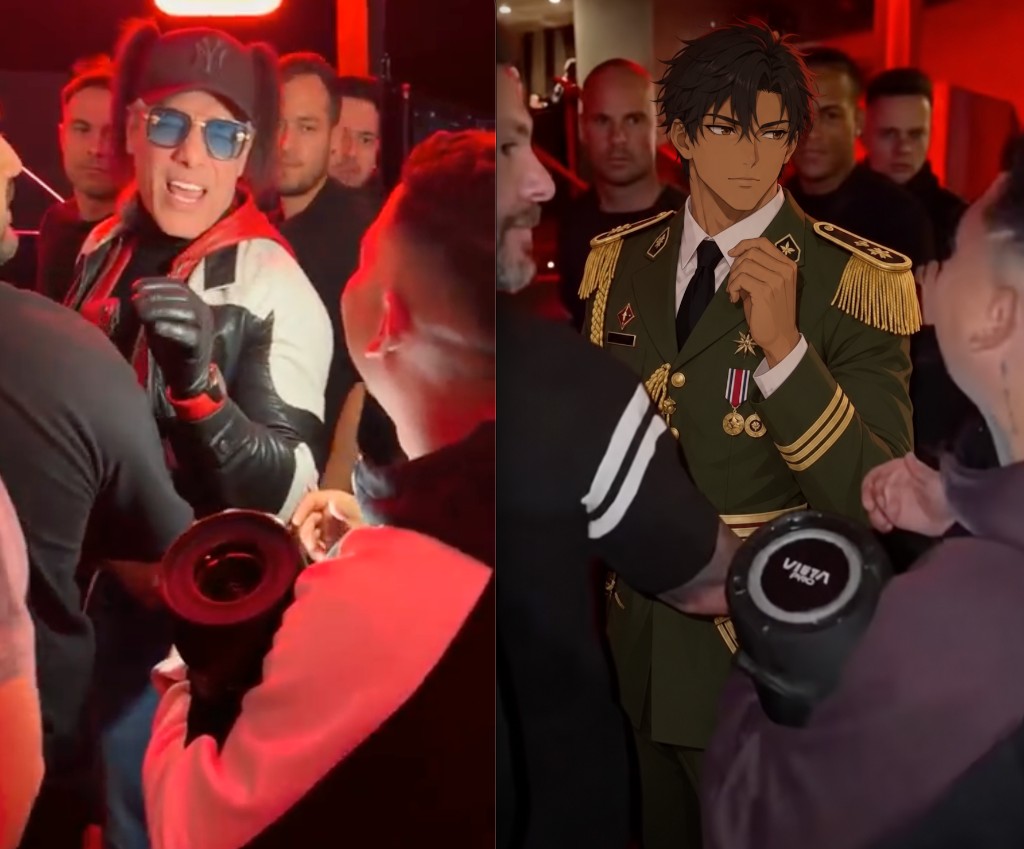
The Bulin 47 AI trend puts you on the mic in the viral freestyle clip — same moves, same camera, same crowd energy — then people post the result to TikTok and Reels. You do not need CapCut timelines or prompt engineering. On Genjutsu AI, the workflow is simple: upload the freestyle video as your template, add one clear person photo, and run a subject replacement.
This guide walks through the homepage generator step by step. Genjutsu AI is an independent tool and is not affiliated with, endorsed by, or sponsored by Bulin 47, Kevin Wai, or their labels.
What the Bulin 47 AI trend is
The source clip is the street freestyle of Dominican artist Bulin 47 improvising over Kevin Wai’s speaker outside a restaurant in Madrid. AI versions keep the staging and motion, then recast the performer as someone else — you, a friend, or a character you have rights to use.
Typical output format for social:
- About 19 seconds
- 9:16 vertical
- MP4, ready for TikTok / Reels / Shorts
Before you upload: authorization comes first
Only use a real-person photo when that person has authorized this use.
- Prefer a photo of yourself, or someone who explicitly allowed you to generate and publish the video.
- The person must be 18+.
- Do not upload celebrities, public figures, or anyone who did not consent.
- Do not use the result to impersonate someone or spread misleading content.
Genjutsu AI expects you to confirm rights over every likeness you upload. If you cannot show permission, pick another reference — pets and illustrated characters are common alternatives in this trend when a person photo is not appropriate.
What you need
- Freestyle template video — the Bulin 47 freestyle clip (or a licensed copy you may edit). Homepage clips are typically 4–30 seconds.
- One person photo — front-facing, face + hair + upper body visible, good light, one person, no heavy filters or sunglasses.
- Mode — Objects Swap (or Motion Transfer if you want a broader restage).
- Account credits — generation is prepaid; check the estimated credits on the homepage before you submit.
Photo tips that improve the render:
- Eyes visible, camera-facing
- Upper body in frame — not a tight face crop
- Sharp, well-lit file (JPG / PNG / WebP)
How to make the video on Genjutsu AI
1. Open the Bulin 47 page (or the homepage generator)
For the one-photo preset, open Bulin 47 AI video. Or use the main composer on the homepage if you want to upload your own freestyle clip.
2. Upload the freestyle as your video template
Add the Bulin 47 freestyle MP4 as the reference video. This file supplies motion, camera path, duration, and crowd framing. Keep it short and vertical when you can.
3. Choose Objects Swap
Select Objects Swap when your goal is to replace the performer with the person in your photo while keeping the freestyle staging.
Use Motion Transfer if you also want a heavier scene or style change around the same performance.
4. Add one authorized person photo
Upload a single clear photo of the person who will appear in the freestyle. Confirm again that you have their permission (or that it is you).
5. Write a direct prompt
Tell the model what to keep and what to change. Example:
Replace the performer in @Video1 with the person in @Image1. Keep the original freestyle moves, camera path, crowd, and timing. Use only this authorized likeness.
Add constraints if something must stay fixed (clothing silhouette, mic hand, street background).
6. Pick resolution and generate
Choose 480p, 720p, or 1080p, review the credit estimate, then generate. Jobs usually take several minutes; you can leave the tab and download from your library when the task finishes.
7. Download and post
Download the MP4. For TikTok or Reels, many creators upload a silent cut and attach the trending sound inside the app so the audio matches local trends.
Prompt and quality tips
Do
- Name the subject clearly: “replace the freestyle performer with @Image1”
- Keep motion language locked: “same moves, same camera, same timing”
- Use one strong photo instead of many weak ones
Expect some AI limits
- Lip sync is close, not frame-perfect
- Crowd faces or jewelry from the template can occasionally bleed through
- Fast hands and mic motion are hard — a sharper source photo helps
If a job fails, retry with a cleaner front-facing photo and a shorter, clearer prompt. Check the on-screen credit estimate before each attempt.
Bulin 47 AI FAQ
Can I make a Bulin 47 AI video on Genjutsu AI with one photo?
Yes. On the homepage, upload the freestyle video template, add one authorized person photo, choose Objects Swap, write a short replace prompt, and generate.
Do I need the person’s permission?
Yes. Real-person photos must be yourself or someone who authorized this use, and the person must be 18+. Celebrities and public figures are not allowed.
Is Genjutsu AI the official Bulin 47 app?
No. Genjutsu AI is independent and not affiliated with Bulin 47 or Kevin Wai.
How long does generation take?
Often a few minutes, depending on queue and resolution. Finished clips stay available to download from your account.
What resolution should I pick?
Start at 480p to validate likeness and motion, then rerun at 720p or 1080p when you like the framing.
Your turn on the speaker
One freestyle template. One authorized photo. No timeline editing.